Farm owners and managers can check which documents are still valid, which are due to expire soon and which already need to be renewed.
New changes:
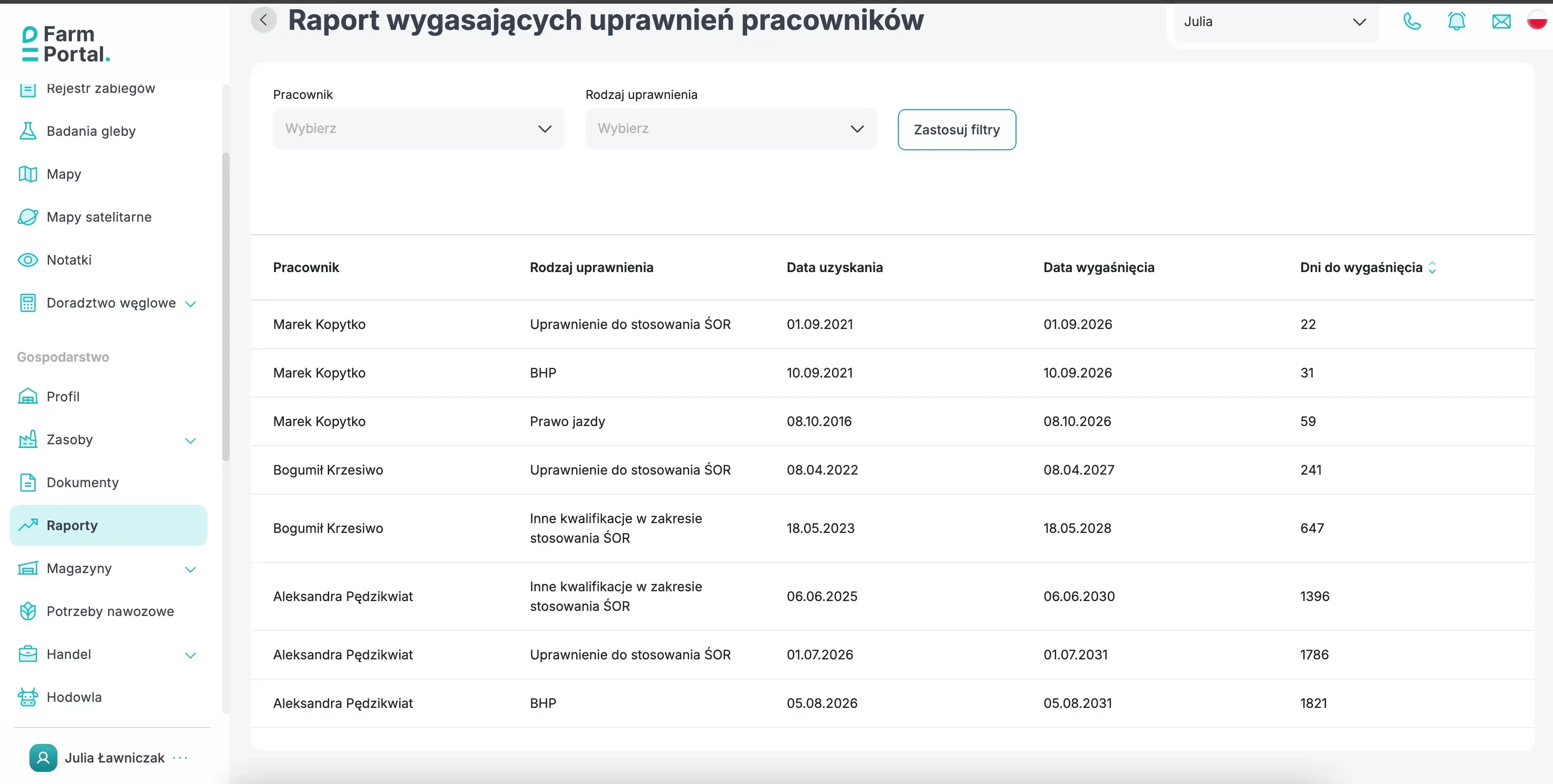
- A new report on expiring employee qualifications has been added.
- The report draws its data directly from employee profiles.
- It shows the date obtained, expiry date and the number of days remaining.
- Results can be filtered by employee and by one or more qualification types.
- Scans of certificates and other documents can be stored in the employee profile.
Why is it important to monitor employee qualifications?
Farm employees drive vehicles, operate machinery, apply plant protection products and carry out tasks that require knowledge of occupational health and safety rules. Some qualifications are required directly by law, while others follow from the employee’s duties, workplace instructions and the employer’s internal procedures.
Anyone applying plant protection products intended for professional users must meet the relevant qualification requirements. A certificate confirming completion of basic or supplementary training in the use of plant protection products is valid for five years. The training requirement is described on the national website of Państwowa Inspekcja Ochrony Roślin i Nasiennictwa (State Plant Health and Seed Inspection Service) , while the period of validity is set out in Article 64(9) of the Act of 8 March 2013 on Plant Protection Products (accessed 24 July 2026).

Driving a motor vehicle without the required entitlement on a public road, in a residential zone or in a traffic zone may result in detention, restriction of liberty or a fine of at least PLN 1,500. In such cases, the court also imposes a driving ban. Polish Code of Petty Offences, Article 94 (accessed 24 July 2026).
An employer must not allow a person to work unless they have the required qualifications, the necessary skills and sufficient knowledge of occupational health and safety rules. From 8 July 2026, a person responsible for health and safety, or anyone managing employees, may be fined between PLN 2,000 and PLN 60,000 for breaching health and safety regulations or principles. Polish Labour Code, Articles 2373 and 283 (accessed 24 July 2026).
An up-to-date list of expiry dates does not replace checks of the original documents, but it reduces the risk of overlooking a training, medical examination or qualification renewal date.
Which qualifications should be recorded?
The required documentation depends on the type of production, the machinery in use and the duties assigned to each employee. The table below distinguishes qualifications required by law from records maintained for operational purposes.
| Qualification type | Purpose | Period of validity | What can be recorded in FarmPortal? |
|---|---|---|---|
| Training in the use of plant protection products | Professional application of plant protection products | Five years | Training type, date obtained, expiry date, notes and a scan of the certificate |
| Driving licence | Driving a vehicle on public roads within the scope of the relevant licence category | As stated on the document | Licence category or description, relevant dates and a scan of the document |
| Health and safety training | Authorisation to begin work and confirmation that the required training has been completed | Depends on the type of training and the role | Training date, next training due date and the document confirming completion |
| Training to operate a combine harvester or forage harvester | Evidence of training, workplace instruction or compliance with the employer’s requirements | Depends on the document and the organisation’s procedures | Machine type, relevant dates, a description of the training scope and an attached certificate |
| Other qualifications | Additional licences, certificates and authorisations required on the farm | As stated on the document | A custom description, date obtained, expiry date and supporting file |
Important: an entry in FarmPortal is for record-keeping purposes only. It does not confer a qualification and does not replace a document issued by the relevant authority or training provider.
Qualifications and documents in the employee profile
The report uses information recorded in each employee profile. A profile may contain personal and address details, employment information, payroll data, qualifications and attached documents.
In the Qualifications tab, the user selects the type of qualification, enters the date it was obtained and, where the document has a fixed validity period, its expiry date. The description field can be used to record a driving licence category, the scope of training, a certificate number or details of the machine covered by the training.
The Documents tab is used to store files associated with the employee, including scans of driving licences, professional certificates, plant protection product training certificates, health and safety records, employment contracts and other documents required during an inspection or audit. This links each recorded expiry date to the document that confirms the qualification.
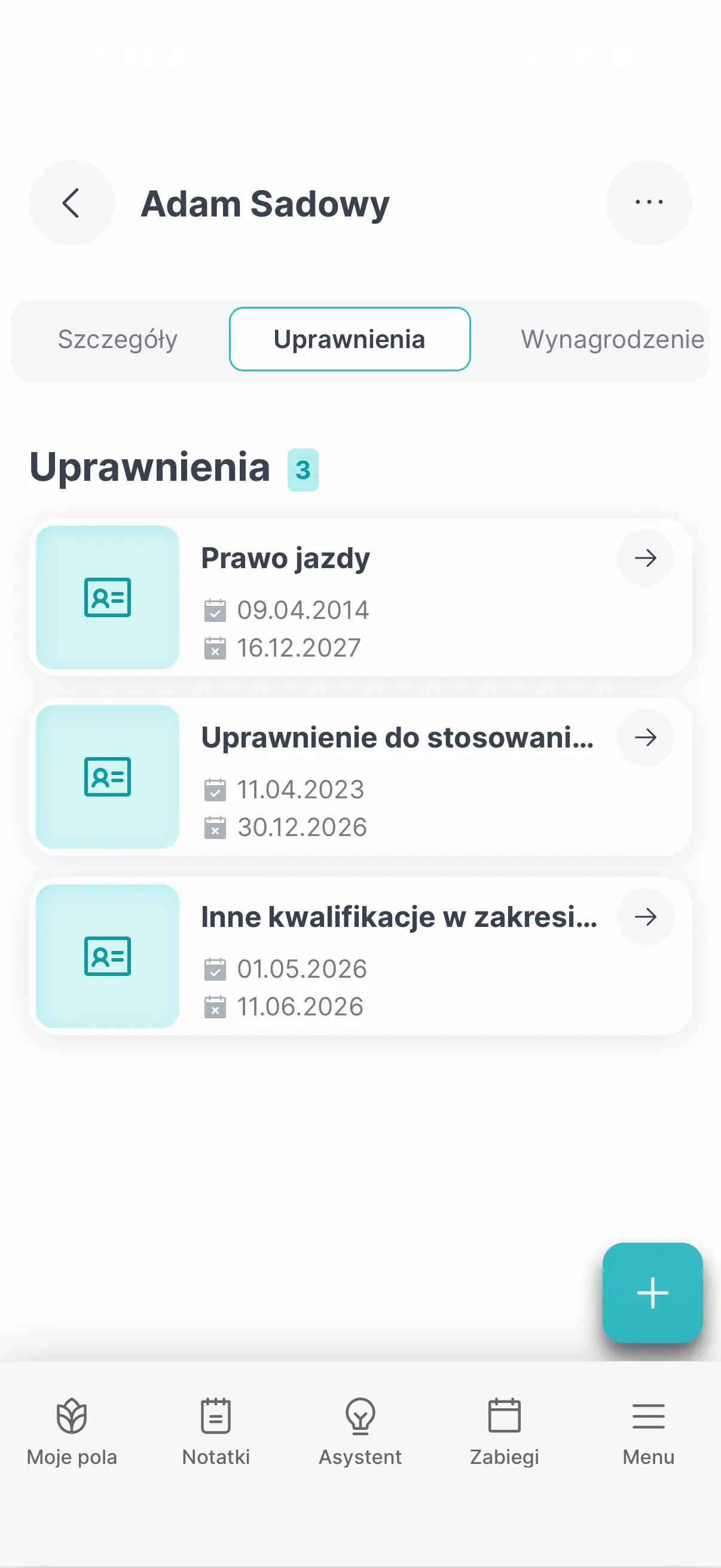
How does information from the employee profile appear in the report?
- Go to Resources → Employees.
- Open the profile of the relevant employee.
- Add a new entry in the Qualifications tab.
- Select the qualification type and enter the date obtained.
- Set the expiry date and add a description where necessary.
- Save the changes.
An entry with an expiry date will be included in the report. Qualifications without an end date do not appear in the list of expiring documents. Once a qualification has been renewed, update the dates in the employee profile.
Where can the report be found?
The report is available under Farm → Reports. It includes qualifications for which an expiry date has been entered in the relevant employee profile.
Filters above the table let users narrow the results by employee and qualification type. One or more categories can be selected, such as health and safety training and driving licences. Select Apply filters to refresh the report using the chosen criteria.
Which fields does the report contain?
| Field or column | Description |
|---|---|
| Employee — filter | Restricts the results to qualifications assigned to the selected employee. If no employee is selected, the table includes all matching records. |
| Qualification type — filter | Narrows the report to one or more qualification types. |
| Apply filters | Refreshes the report using the selected criteria. |
| Employee | The full name of the person to whom the qualification has been assigned. |
| Qualification type | The name of the qualification recorded in the employee profile. |
| Date obtained | The date on which the document was issued, the training was completed or the qualification was awarded. |
| Expiry date | The date on which the document or qualification ceases to be valid. |
| Days until expiry | The number of days remaining until the expiry date. A negative value shows how many days have passed since the document expired. |
The Days until expiry column can be sorted in ascending or descending order. A value of ‘7’ means that the document will expire in seven days, while ‘−99’ means that it expired 99 days ago.
How can the report be used in practice?
The report is useful before the plant protection season, the start of harvest, an audit or the allocation of employees to specific machines. Sorting by the number of days until expiry brings the documents requiring the earliest action to the top of the list.
Before spraying begins, users can filter the report to show only qualifications relating to plant protection products. Ahead of harvest, they can check entries concerning combine harvesters or forage harvesters. The report can also support the planning of periodic health and safety training and the updating of seasonal workers’ documents.
The reliability of the report depends on the information entered in employee profiles. Dates and attachments should therefore be updated after each training course, document renewal or change in duties.
FAQ
What happens when an employee’s qualification expires?
FarmPortal does not renew the document automatically. The report will show a negative number of days. Once the new document has been issued, update the dates in the employee profile.
Can I add my own qualification type?
Yes. The ‘Other’ category can be used to record additional qualifications required on the farm or for a particular role.
Can scanned employee documents be stored in FarmPortal?
Yes. The Documents tab can hold scans of driving licences, certificates, training records, health and safety documents and employment contracts.
Check qualification expiry dates in one report
Enter the relevant expiry dates in employee profiles, then go to Farm → Reports to identify documents that need to be renewed.
Legal sources
- Act of 26 June 1974 — Polish Labour Code (Kodeks pracy), in particular Articles 2373 and 283; consolidated text available through ISAP (accessed 24 July 2026).
- Act of 20 May 1971 — Polish Code of Petty Offences (Kodeks wykroczeń), Article 94; consolidated text available through the Polish Sejm’s ELI system (accessed 24 July 2026).
- Act of 8 March 2013 on Plant Protection Products. The consolidated text was announced in the Notice of the Marshal of the Sejm dated 22 April 2026 (Journal of Laws of 2026, item 624) and reflects the legal position as at 21 April 2026 (accessed 24 July 2026).
- Państwowa Inspekcja Ochrony Roślin i Nasiennictwa (State Plant Health and Seed Inspection Service), ‘Reminder of the requirement to complete training in the use of plant protection products’ — national source (accessed 24 July 2026).